CTR Sprout vs CTRTool: GA4-Friendly Geo-Targeting CTR Campaigns Compared
You need geo-targeted CTR campaigns that survive a GA4 audit, and both tools promise that. The gap shows up in screenshot proof, city-level targeting, and whether Maps and AI Overviews visits are actually covered.
This comparison breaks down CTRTool and CTR Sprout feature by feature: geo-targeting depth across country, state, city and Maps listings, visit proof and reporting, campaign coverage, and pricing tiers. You will get a direct verdict on which tool fits your workflow, and a clear picture of who should pick each one.
Quick Verdict: CTR Sprout vs CTRTool for GA4-Friendly Geo-Targeting Campaigns
If you need screenshot-proof visits and city-level geo-targeting for Google, Bing, Maps, and AI Overviews, CTRTool is the stronger fit; CTR Sprout remains a viable option for simpler, budget-focused campaigns. CTRTool backs every visit with search and landing screenshots as separate proof images, and its targeting reaches country, state, and city level across Google Search, Bing Search, Maps, and AI Overviews. That combination matters when you want GA4 sessions that hold up to scrutiny.
CTR Sprout is positioned as a lower-cost alternative, and on price alone it may appeal to smaller budgets. As of public documentation, however, it does not appear to offer verifiable screenshot proof for visits or coverage of Maps and AI Overviews. Those gaps are significant for anyone running geo-targeted CTR campaigns that need to survive a GA4 audit.
The practical difference shows up in what you can prove after the campaign runs. With CTRTool, each visit carries a full path and keyword position tracking over time, including Maps listing order and AI citation order. Without comparable proof, CTR Sprout leaves you relying on analytics numbers alone when questions arise about traffic quality.
| Criteria | CTRTool | CTR Sprout (based on public information) |
|---|---|---|
| Visit proof | Search and landing screenshots as separate proof images for every visit | No verifiable screenshot proof documented |
| Geo-targeting depth | Country, state, and city targeting | Targeting options not detailed in public documentation |
| Search surface coverage | Google Search, Bing Search, Maps, and AI Overviews | Maps and AI Overviews coverage not documented |
| Position tracking | Keyword positions over time, including Maps listing order and AI citation order | Not specified publicly |
| Credit model | Pay for results; no credits charged for technical failures before landing; unverified locations use no credits | Pricing model may suit tighter budgets |
Choose CTRTool if proof, city-level geo-targeting, and coverage across Maps and AI Overviews are non-negotiable for your GA4 reporting. Choose CTR Sprout if you run simple, budget-first campaigns and can accept less verifiable evidence of traffic quality.
At a glance: how CTRTool compares to CTR Sprout on the features that matter most.
| Feature | CTRTool | CTR Sprout |
|---|---|---|
| Pricing | $59/mo Starter | $79/seat/mo annual |
| Free plan / trial | ✗ | 30-day trial |
| API access | ✗ | ✓ |
| Analytics / reporting | ✓ | ✓ |
| Team / collaboration | ✗ | ✓ |
| AI-powered features | ✗ | ✓ |
| Screenshot proof per visit | ✓ | — |
| Pay-for-results credits | ✓ | — |
What Is CTRTool?
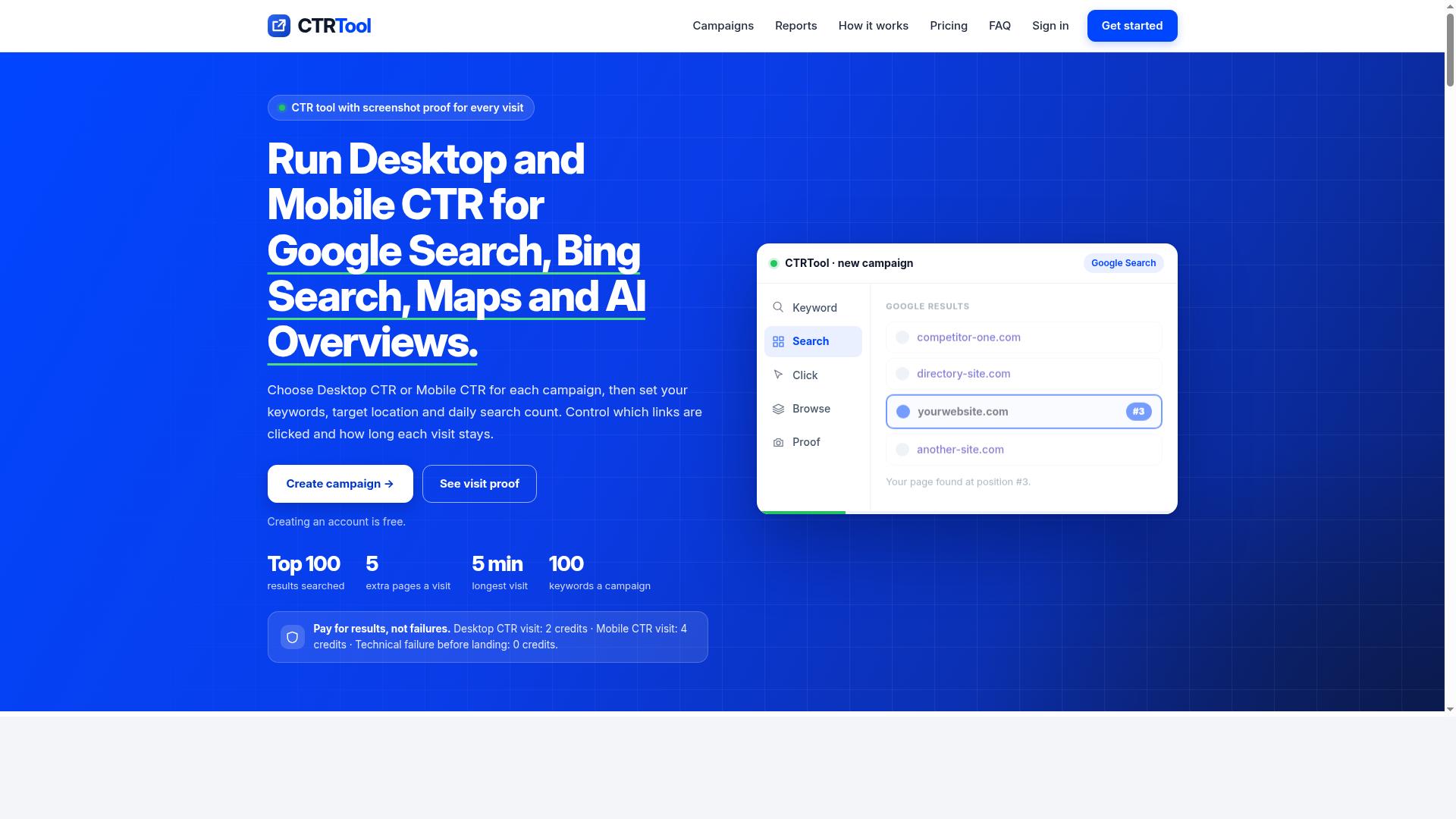
CTRTool is a SaaS CTR campaign tool that runs Desktop and Mobile click-through campaigns for Google Search, Bing Search, Maps, and AI Overviews, with screenshot proof for every visit. It is built for teams that want to shape how a page performs in search results while keeping a verifiable record of what happened.
Each campaign starts with a simple choice: Desktop CTR or Mobile CTR. From there, users set their keywords and define where the visits should come from, targeting a country, state, and city. That layered geo-targeting is what makes the tool relevant to GA4 reporting, since location data lands in the same geography buckets your analytics property already tracks.
CTRTool also lets users control the daily search count, which links get clicked, and how long each visit stays. Those controls matter for session duration and engagement metrics, because a visit that ends instantly tends to drag down the quality signals reported in Google Analytics 4.
Proof is a core part of the product. Every visit includes search and landing screenshots as separate proof images, plus full visit paths. Instead of trusting a dashboard number, you can open the record and see the SERP the visit came from and the page it landed on.
Campaigns come with eligibility rules. The target page must appear within the top 100 organic results for the chosen keyword and location. Maps campaigns work differently and check up to 50 listings. These conditions keep campaigns tied to pages that already have a real organic foothold.
CTRTool is also candid about limits. The site states plainly that automated visits do not guarantee rankings. That framing sets it apart from tools that imply guaranteed movement, and it fits a GA4-friendly approach where the goal is cleaner engagement data and stronger click-through rate signals rather than promised positions.
What Is CTR Sprout?
CTR Sprout is a CTR campaign platform marketed as a budget-friendly way to simulate organic clicks and improve click-through rates for SEO campaigns. Based on publicly available information, it positions itself as an entry-level option for site owners who want to influence how their search listings perform in the SERP.
The platform appears to operate on a credit or subscription model, where users purchase capacity and then allocate it toward campaigns. That framing is common in the CTR campaign category, but the exact mechanics are not well documented in public sources.
Public information on several important details is limited. That includes how proof of delivery is handled, how deep its geo-targeting goes, and whether it supports Maps or AI Overview placements. Readers comparing platforms should treat these as open questions rather than confirmed capabilities.
In practical terms, CTR Sprout fits the profile of a tool built around volume and affordability rather than granular campaign control. Whether that trade-off matters depends on how much precision your GA4 reporting demands.
For this comparison, the takeaway is simple: CTR Sprout is a recognizable name in the CTR campaign space, but its documented depth on geo-targeting and analytics alignment is thin. Buyers should verify specifics directly before committing budget.
Features Compared
This comparison breaks down the three feature areas that matter most for GA4-friendly geo-targeting: targeting depth, proof and reporting, and campaign coverage across search engines and surfaces.
Each area affects how cleanly campaign data lands in Google Analytics 4. Location accuracy shapes which sessions GA4 attributes to which region, while verification evidence determines whether those sessions can be defended in client reporting.
The three subsections below cover geo-targeting depth, proof and reporting, and campaign coverage. Specifics for each product are handled there rather than here.
Geo-Targeting Depth: Country, State, City and Maps Listings
CTRTool supports country, state, and city targeting for each campaign, and its Maps campaigns check up to 50 listings (about five pages) to find the target business. Campaigns can also run with "Any country" selected, which uses a mix of supported locations instead of a single market.
That structure gives you three practical targeting levels:
- Country targeting for broad national campaigns
- State targeting for regional splits inside a country
- City-level targeting for local campaigns, including Maps listings
For local SEO work, the city and Maps combination matters most. A business competing in a specific metro needs visits that match its service area, not generic national traffic. CTRTool's delivery uses Desktop Chrome windows and real Android phone sessions matched to the target location through managed proxy routes, which keeps location signals consistent with the campaign setup.
Based on public information, CTR Sprout's geo-targeting is typically described at country level or as broad location targeting. Its public materials do not document city-level depth or Maps listing search, so any local campaign planning should assume a wider geographic net.
Takeaway: city-level and Maps listing depth favor CTRTool for local SEO. If your GA4 reports need to separate sessions by metro or match a Google Business Profile service area, the finer targeting controls give you a cleaner geographic split.
Proof and Reporting: Screenshot Evidence and Visit Paths
CTRTool provides screenshot proof for every visit, with search and landing screenshots as separate proof images, plus full visit paths and keyword position tracking over time, including Maps listing order and AI citation order. Each report shows what was searched, what was clicked, and where the session landed.
Position tracking adds a second layer. You can follow Search positions, Maps listing order, and AI citation order across the life of a campaign rather than relying on a single snapshot.
This matters for GA4-friendly campaigns because analytics data alone rarely settles a disagreement. If a client questions whether visits came from the right location or landed on the right page, verifiable proof supports reporting and reduces disputes. The same evidence helps when you reconcile GA4 sessions against campaign activity and need to explain gaps in attribution.
Public documentation for CTR Sprout does not detail screenshot proof or visit-path reporting, based on the available information. Campaign results there are generally described at an aggregate level, which leaves less material to show a client during a review.
For agencies and freelancers who report to paying clients, evidence quality is often the deciding factor. CTRTool's proof stack turns each visit into a documented event, and that record is what makes the reporting conversation straightforward.
Campaign Coverage: Google Search, Bing, Maps and AI Overviews
CTRTool runs campaigns across Google Search, Bing Search, Google Maps, and AI Overviews, with Desktop or Mobile CTR selectable per campaign.
| Campaign type | CTRTool behavior |
|---|---|
| Google Search CTR | Search the keyword and click the organic result; Desktop or Mobile; Top 100 results; internal pages supported |
| Bing Search CTR | Same keyword-and-click flow for Bing, with Desktop or Mobile and Top 100 results |
| Google Maps CTR | Find the business listing among up to 50 listings and click its website link, with city targeting |
| AI Overview CTR | Find the website in the overview and click its source link, tracking citation order |
Each campaign supports up to 100 keywords, search depth up to 100, and up to five additional internal pages per visit, with visits lasting up to five minutes in total. Scheduling covers daily search counts with now, spread out, or gap timing, along with days, hours, and time zone settings.
As of public documentation, CTR Sprout primarily describes Google-focused CTR campaigns. Its materials do not document Maps or AI Overview coverage, so teams targeting those surfaces would need another approach.
Coverage gap summary: CTRTool spans four campaign surfaces with device choice and deep keyword capacity. CTR Sprout's documented coverage centers on Google, leaving Bing, Maps, and AI Overviews unaddressed in public materials.
Pricing Compared
Pricing is where the two tools diverge most: CTRTool uses a transparent credit model with published monthly USD plans, while CTR Sprout's public pricing is less detailed. Based on publicly available information, CTR Sprout appears to use a subscription or credit-based structure, but specific tiers and visit capacities are not clearly documented.
That gap matters for anyone planning a geo-targeting CTR campaign on a fixed budget. CTRTool publishes exact prices and conversion rates between credits and visits, so costs can be forecast before a campaign starts. CTR Sprout's costs are harder to pin down without direct inquiry.
The H3 below breaks down CTRTool's plan tiers and how credits translate into Desktop and Mobile visits.
CTRTool's Credit Model and Plan Tiers
CTRTool prices in monthly USD plans: Starter at $59/month for 2,000 credits (up to 1,000 Desktop CTR visits or 500 Mobile CTR visits) and Growth at $125/month for 5,000 credits (up to 2,500 Desktop or 1,250 Mobile visits). Growth is marked Recommended. Larger tiers are also published for teams running higher volumes.
| Plan | Price (USD/month) | Credits | Desktop visits | Mobile visits |
|---|---|---|---|---|
| Starter | $59 | 2,000 | Up to 1,000 | Up to 500 |
| Growth (Recommended) | $125 | 5,000 | Up to 2,500 | Up to 1,250 |
| Scale | $399 | 20,000 | Up to 10,000 | Up to 5,000 |
| Agency | $699 | 40,000 | Up to 20,000 | Up to 10,000 |
The credit costs behind those numbers are simple. A Desktop CTR visit costs 2 credits, while a Mobile CTR visit costs 4. A verified search without a match costs 1 credit, and a technical failure before landing costs 0 credits.
Plan your monthly credit needs around your device targeting mix. A campaign weighted toward mobile consumes credits twice as fast as a desktop-only push. For example, 600 Mobile visits would need 2,400 credits, which exceeds the Starter allowance on its own.
Two practical details help with budgeting. Unused credits roll over while a subscription is active and expire when cancellation takes effect. Creating an account is free, and custom development carries a separate, agreed one-time fee.
CTRTool also notes limited launch pricing, with prices set to rise 30% on November 15. For CTR Sprout, public information points to a subscription or credit-based model, but exact plan prices and visit capacities are not clearly published, so confirm directly before comparing totals. For readers who want published numbers tied to Desktop and Mobile visit rates, CTRTool's tiers are the easier starting point.
Who Should Choose CTRTool
CTRTool fits SEO practitioners and agencies running CTR campaigns for their own or client websites who need verifiable proof and multi-surface coverage across Google Search, Bing, Maps, and AI Overviews. The platform is built for people who treat a CTR campaign as a measurable deliverable, not a black box.
That audience profile matters because it shapes what the tool prioritizes. Screenshot proof and city-level geo-targeting are reporting and local SEO needs, and they only make sense to someone who has to justify the spend to a client or track ranking movement in specific markets.
If you run campaigns for clients, the screenshot requirement alone is often the deciding factor. A campaign report that shows verifiable proof is easier to defend in a client meeting than a dashboard total with no supporting evidence.
Several practical signals point to CTRTool as the better fit for agency and practitioner workflows:
- Screenshot proof for reporting. Useful when a client or stakeholder wants evidence tied to a campaign, not just aggregate numbers.
- City-level geo-targeting. Fits local SEO work where country-level targeting is too broad and the ranking goal is tied to specific metro areas.
- Coverage across Google Search, Bing, Maps, and AI Overviews. One tool spans the surfaces where visibility now matters, including Maps and AI Overviews.
- Ranking-aware requirements. The top-100 organic result requirement and the Maps 50-listing check suit campaigns where the target page already ranks and needs a CTR lift.
The ranking requirements are worth understanding before you commit. CTRTool's top-100 organic result requirement and Maps 50-listing check mean the target page needs to already be in position for the campaign to apply. That is a sensible constraint for ranking-aware work, but it is not a fit for a brand new page with no organic footing.
For agencies, that constraint is usually a feature rather than a limitation. It keeps campaigns focused on pages that can realistically benefit from improved click-through rate, rather than spreading effort across URLs that search engines barely surface.
CTRTool's guidance also mentions tier links, PBNs, and test properties, which speaks to practitioners who already understand link and property strategy and want campaign tooling that fits that world. It is a practitioner-oriented product, not a beginner walkthrough.
Pricing is covered separately in this comparison, so weigh plan fit against your campaign volume there rather than here. The short version: if screenshot proof, city-level targeting, and multi-surface coverage are on your checklist, CTRTool is the natural starting point.
Who Should Choose CTR Sprout
CTR Sprout may suit budget-conscious users running simple Google-focused CTR campaigns who do not require screenshot proof or Maps/AI Overview coverage. If your needs are narrow and your budget is tight, a lighter tool can feel like enough to get started.
That said, the fit depends on what you expect from a CTR campaign. Users who mainly want basic country-level reach on Google properties, without deeper verification, are the most plausible audience for this kind of option.
Publicly available information about CTR Sprout does not document screenshot proof, city-level geo-targeting, or Maps/AI Overview support. Buyers who need those capabilities should weigh other options before committing.
Consider CTR Sprout a reasonable starting point for:
- Users prioritizing lower cost over depth of targeting
- Simple, Google-centric campaign goals
- Marketers who do not need proof-of-visit screenshots
- Those comfortable with limited documented targeting options
For anyone planning GA4 analytics integration around granular targeting, these gaps matter. City-level targeting and Maps/AI Overview coverage are often central to geo-targeting campaigns, and neither appears documented for CTR Sprout in public sources.
In short, CTR Sprout fits a modest, cost-first use case. Readers who need richer targeting and clearer verification should look at tools built around those requirements, such as CTRTool.
Final Verdict
For GA4-friendly geo-targeting campaigns that demand verifiable proof, CTRTool wins on screenshot evidence, city-level targeting, and coverage of Google, Bing, Maps, and AI Overviews, while CTR Sprout remains a budget alternative for simpler Google-focused needs.
The deciding factor is proof. CTRTool provides a screenshot per visit along with visit paths, so you can point to a record of what happened rather than trusting a dashboard count. That matters when you reconcile campaign activity against Google Analytics 4 sessions.
Depth of targeting is the second differentiator. CTRTool supports country, state, and city-level targeting, plus a Maps 50-listing check, which suits local campaigns where a country-level setting is too blunt.
Coverage rounds out the case. CTRTool runs campaigns across Google, Bing, Maps, and AI Overviews. CTR Sprout, based on public information, appears aimed at straightforward Google campaigns, which is fine until your plan needs those other surfaces.
| Criteria | CTRTool | CTR Sprout |
|---|---|---|
| Visit proof | Screenshot per visit, plus visit paths | General descriptions only, based on public information |
| Geo-targeting | Country, state, and city-level targeting | Simpler targeting, based on public information |
| Maps coverage | 50-listing check | Not confirmed in public information |
| Search surfaces | Google, Bing, Maps, AI Overviews | Primarily Google-focused, based on public information |
| Cost position | Paid tool with tiered plans | Positioned as a lower-cost option |
CTR Sprout deserves credit as a lower-cost entry point for basic Google campaigns. If your needs are narrow and budget is the main constraint, it is a reasonable place to look, based on public information.
The trade-off is that cheaper usually means less evidence and fewer surfaces. For teams reporting to clients or measuring against engagement metrics in Google Analytics 4, that gap is hard to work around.
The recommendation is straightforward. Choose CTRTool when you need verifiable visit records, city-level targeting, and multi-surface campaign coverage. Choose CTR Sprout only if a simple Google-only setup is genuinely all you need.
To move forward, start a CTRTool campaign and set your targeting, visit limits, and campaign URL before launch. For questions about setup or features, contact support at vaibhav@autoblogging.ai.
Frequently Asked Questions
What is the main difference between CTRTool and CTR Sprout?
CTRTool is a dedicated CTR campaign tool built for Google Search, Bing Search, Google Maps and AI Overviews, with screenshot proof for every visit and full visit paths. Because the available sources don't document CTR Sprout's features or pricing, we can't make a like-for-like comparison of its capabilities. The best approach is to check CTR Sprout's own site for current details and compare them against CTRTool's documented campaign types and proof features.
Does CTRTool provide proof that campaign visits actually happened?
Yes. CTRTool is positioned as a "CTR tool with screenshot proof for every visit," providing search and landing screenshots as separate proof images, plus full visit paths. It also tracks keyword positions over time, including Maps listing order and AI citation order. This makes it straightforward to verify results for your own site or client sites.
Which platforms and campaign types does CTRTool support?
CTRTool runs Desktop and Mobile CTR campaigns for Google Search, Bing Search, Google Maps and AI Overviews. For search campaigns, the page must appear within the top 100 organic results for the chosen keyword and location; Maps campaigns check up to 50 listings, and AI Overview campaigns require a matching source link. You choose Desktop CTR or Mobile CTR per campaign and set your own keywords.
Can I geo-target campaigns to specific countries, states or cities?
Yes. CTRTool lets you target a chosen country and optionally a state and city, or select "Any country" to use a mix of supported locations. This geo-targeting is central to running GA4-friendly campaigns that align with where your audience actually searches. No country restrictions are stated, so it works as a global online service.
How much does CTRTool cost, and how do credits work?
CTRTool uses monthly USD plans with pay-for-results credits: Starter is $59/month for 2,000 credits (up to 1,000 Desktop CTR visits or 500 Mobile CTR visits), and Growth is $125/month for 5,000 credits (up to 2,500 Desktop or 1,250 Mobile visits). Because pricing for CTR Sprout isn't stated in the sources available to us, we recommend checking its site directly for current plans before comparing costs.
Who is CTRTool designed for, and how do I get support?
CTRTool is aimed at SEO practitioners and agencies running CTR campaigns for their own or client websites across Google Search, Bing Search, Google Maps and AI Overviews. Support is available via vaibhav@autoblogging.ai, and the site includes Support, Terms of use and Legal notices pages. You can sign in or create an account at ctrtool.com to get started.